Ken's Fiery Shoryuken Showdown - Flux.1.1 pro
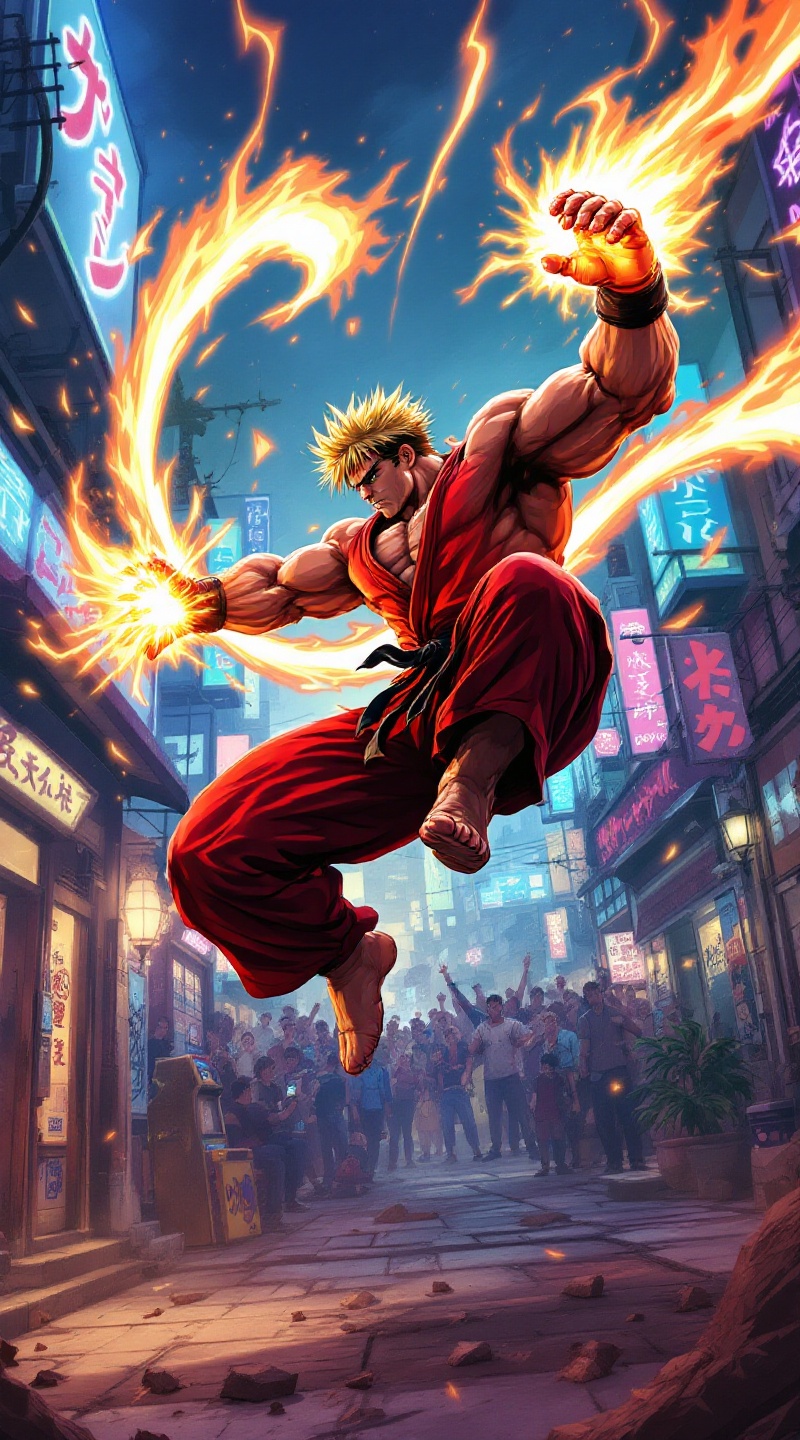
Ken's Fiery Shoryuken Showdown
الدقة: 800x1440حجم الصورة: 475.1 KBوقت الإنشاء: 2025 / 01 / 04

الموجه

**Prompt:** Create a dynamic and vibrant illustration inspired by the fighting game genre, specifically "Street Fighter II." Focus on Ken Masters, a muscular fighter with spiky blonde hair, wearing a red gi and black belt, showcasing his fierce determination. Capture his signature move, the Shoryuken, as he launches into the air, surrounded by a fiery aura. The background should depict an iconic urban setting, like a bustling street in Japan, with neon lights and a cheering crowd. Include elements like a classic arcade machine and graffiti art to enhance the atmosphere. The overall mood should be intense and energetic, reflecting the competitive spirit of the game, with bold colors and dramatic lighting to emphasize the action.

النموذج
Flux.1.1 pro
علامة مائية:
حقوق الطبع والنشر: المستخدمون المدفوعون يمتلكون حقوق صورهم.
خصم 20% على الاشتراك السنوي

تحليل مفصل لـ Prompt صورة Flyne AI

حلّل الـ Prompt التفصيلي المستخدم لإنشاء الصورة بواسطة Flyne AI Image Generator.

عنوان الصورة : Ken's Fiery Shoryuken Showdown
Prompt : **Prompt:** Create a dynamic and vibrant illustration inspired by the fighting game genre, specifically "Street Fighter II." Focus on Ken Masters, a muscular fighter with spiky blonde hair, wearing a red gi and black belt, showcasing his fierce determination. Capture his signature move, the Shoryuken, as he launches into the air, surrounded by a fiery aura. The background should depict an iconic urban setting, like a bustling street in Japan, with neon lights and a cheering crowd. Include elements like a classic arcade machine and graffiti art to enhance the atmosphere. The overall mood should be intense and energetic, reflecting the competitive spirit of the game, with bold colors and dramatic lighting to emphasize the action.
الحجم
800x1440
النموذج
Flux.1.1 pro
السعر
50 رصيد/صورة
التنسيق
image/jpeg
الفئة

استكشف نصوص Flux لمنشئ صور Flux AI

اكتشف نصوصاً إضافية

كيفية إنشاء صورة باستخدام Flyne AI Image Generator

اتبع هذه الخطوات الأربع البسيطة لإنشاء الصورة التي ترغب فيها.

الخطوة 1: أدخل نصك (لا تتردد في تحسين الـ Prompt للحصول على نتائج أفضل)

الخطوة 2: اختر نسبة عرض الصورة

الخطوة 3: اختر نموذج الصورة الخاص بك:

الخطوة 4: انقر على زر التوليد وانتظر بضع ثوانٍ للحصول على صورتك

أدوات Flyne AI ذات الصلة بـ Prompts إنشاء الصور

اكتشف أدوات متقدمة من Flyne AI لتعزيز سير عملك الإبداعي.

ذكاء صناعي للصور

مولد الصور بالذكاء الاصطناعيتحويل صورة إلى صورة بالذكاء الاصطناعيمولد الأنمي بالذكاء الاصطناعيGPT Image 2 AIمولد الصور Nano Bananaمولد الصور الرمزية بالذكاء الاصطناعيتحويل صورة إلى كرتونتصوير المنتجات بالذكاء الاصطناعيتجربة افتراضية للملابس بالذكاء الاصطناعياستعادة الصور القديمةمولد الصور الشخصية بالذكاء الاصطناعيمولد أنماط قص الشعر بالذكاء الاصطناعياستوديو فن جيبليمغير الخلفيات بالذكاء الاصطناعيتلوين الصور بالذكاء الاصطناعيمزيل الكائنات من الصورمولد شخصيات الألعاب بالذكاء الاصطناعيمولد علبة باربي بالذكاء الاصطناعيمولد دمى قطنية بالذكاء الاصطناعيمولد أسلوب سيمبسونز بالذكاء الاصطناعيذكاء جيبلي ستوديوتلوين Nano Bananaمولد الملصقات بالذكاء الاصطناعيذكاء Qwen للصورمولد الصور الواقعية بالذكاء الاصطناعيGoogle Imagen4 AISeedream 4.0 Image AIتحرير صورة Qwenمحرر صور Gemini Flashمولد الصور Recraft AIمولد الميداليات بالذكاء الاصطناعيKrea AIتقويم رأس السنة بالذكاء الاصطناعيمولد صور الهالوين بالذكاء الاصطناعي

مقالات ذات صلة بـ Prompts إنشاء الصور Flux.1.1 pro