Pet Dance Video Generator: Turn Pet Photos into Dance Videos
Use the Pet Dance Video Generator on Flyne to animate a cat, dog or other pet photo. Choose a dance style, describe the scene and optionally add a choreography reference.
Preview Movement Ideas for the Pet Dance Video Generator
Watch the available style previews to choose a direction for your pet photo. Use the dance prompts as starting points and edit the movement for your own clip.
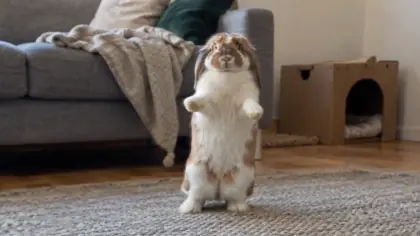
Direct Photos, Dance Styles and Scenes in the Pet Dance Video Generator
Combine a pet image with a style prompt and optional video reference to describe the dancer, movement and setting.
Use your pet photo as the visual reference
Upload a clear image to guide the subject’s appearance. A full-body view makes the intended dancer and its limbs easier to identify.
Start from pet, cat or dog dance prompts
Choose a style template to fill a starting prompt, then adapt its movement and setting to your pet.
Add a choreography reference video
Supply a dance clip when you want to guide the motion with a visual reference alongside your pet image.
Describe the movement and camera
Edit the prompt to request a paw wave, side step or turn, and specify the scene or framing you want for the generated clip.
Shape a Dance Idea from a Still Photo with the Pet Dance Video Generator
Build a short performance from existing images and editable prompts without first filming your pet doing the requested dance.
Begin with a favorite snapshot
Use an existing pet photo as the reference for a new clip, so the creative starting point can be an image you already have.
Use a template to start the prompt
A dance-style prompt provides an initial movement idea that you can refine instead of writing the entire scene from scratch.
Change the scene without retaking the photo
Keep the pet image and revise the prompt’s backdrop, mood or camera direction to explore another generated setting.
Review the result before your next variation
Continue in Create after submission to review the generated movement, then use what you see to refine a later prompt.
Make Greetings and Character Clips with the Pet Dance Video Generator
Turn pet photos into short creative performances by giving each clip a clear occasion, movement or character idea.
A birthday greeting from your pet
Upload a pet photo and describe a cheerful dance with a paw wave to develop a personal birthday-video idea.
A playful pet-diary clip
Use an everyday snapshot and prompt a simple side step in a familiar setting for a lighthearted pet update.
A seasonal dance scene
Describe a festive backdrop and a short movement sequence to turn the pet reference into a themed celebration clip.
An animal character on a small stage
Start from a recognizable animal image and describe a stage, spotlight and finishing pose for a fictional performance.
How to Use the Pet Dance Video Generator on Flyne
Upload a pet image, choose a dance direction and review the available video settings. Generate the clip and continue in Create to check the result.
Upload a clear pet photo with the body and paws visible.
Choose a dance style, edit the prompt and optionally add a choreography clip.
Review the video settings and credits, then generate and inspect the clip in Create.
Prepare Photos and Dance Prompts for the Pet Dance Video Generator
Learn which references to use, how to guide the motion and what to check when reviewing the generated pet video.
Related creation tools
Discover more ways to turn photos and ideas into videos.
Image AI
Video AI
Video AI
Free Tools
Explore Photo and Motion Tips for the Pet Dance Video Generator
Read related video-creation guides to improve reference-image selection, write focused movement prompts and plan the next pet clip.