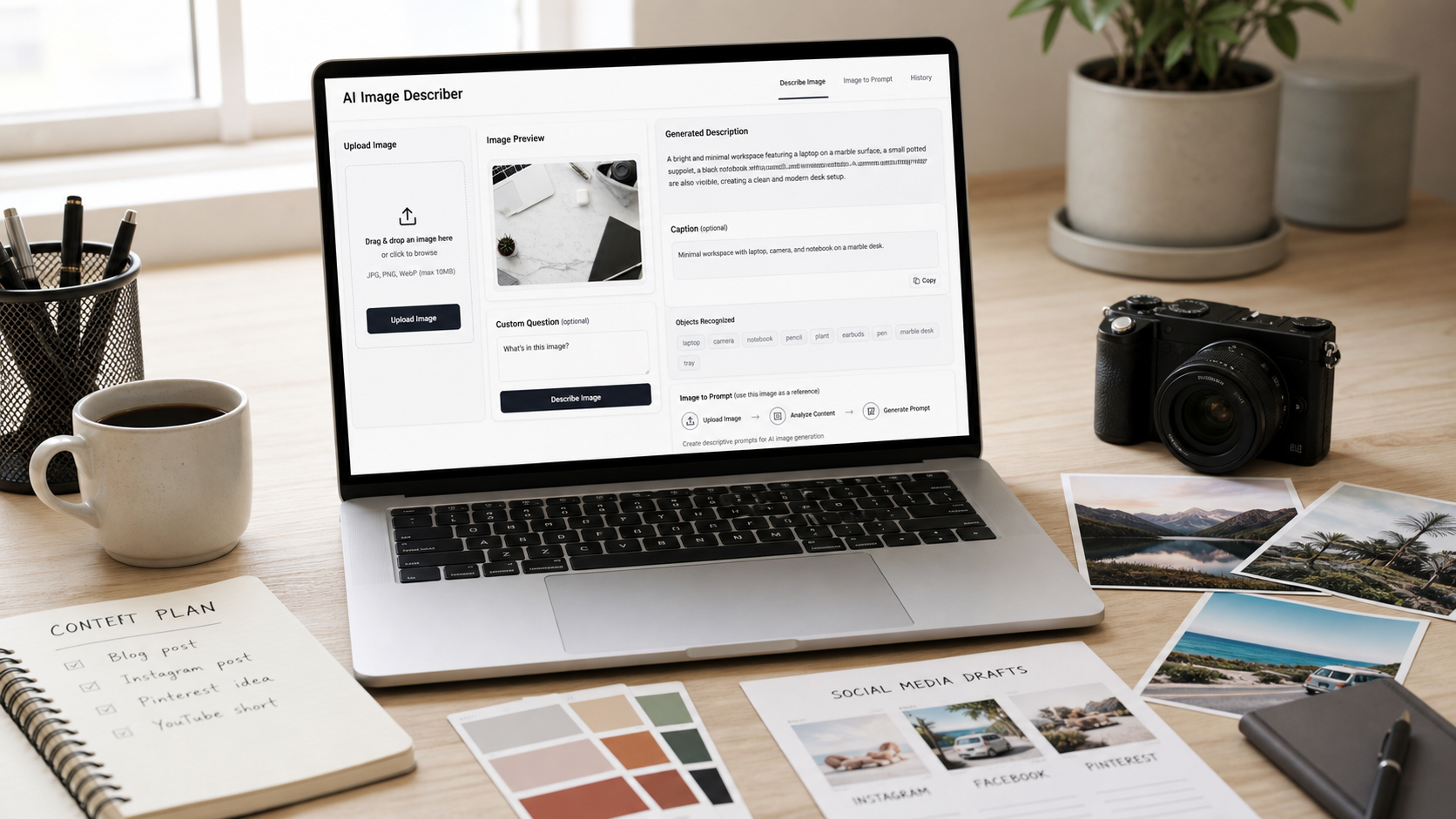
If you need a Picture Describer Free Online tool, the practical goal is simple: upload a picture, ask what you need to know, and turn the visual details into useful text. With Flyne AI’s Free Image Describer, you can create readable descriptions, short captions, object lists, marketing copy, accessibility-style alt text, and image-to-prompt ideas without manually inspecting every detail from scratch.

Quick Summary: Picture Describer Free Online Workflow
A free online picture describer is useful when you want to understand or reuse image content quickly. Instead of staring at a photo and writing from memory, you can upload an image, choose the type of output, ask a custom question, and copy the result into a blog post, product page, social caption, research note, or AI prompt draft.
On Flyne AI, the Image Describer page is the main tool for image understanding. The visible workflow includes image upload or image URL input, output options such as detailed image description, brief image description, describe people, caption title, marketing copy, object recognition, and custom question. That makes it a practical AI tool to describe pictures for creators, bloggers, marketers, students, researchers, ecommerce sellers, social media managers, AI artists, and general users.
The safest way to use any image description generator online is to treat the output as a draft. Review the description for accuracy, remove guesses, and rewrite anything that could imply identity, medical information, legal verification, private details, or unsupported product claims.

What an Image Describer Can Do for Creators, Students, and Marketers
An Image Describer turns visual information into structured language. That can save time when you need a plain description, but it is also useful when you want to repurpose images across different content formats.
For a blogger, an AI image caption and description tool can turn a travel, recipe, interior, or tutorial photo into a natural paragraph. For an ecommerce seller, it can summarize visible product details, materials, colors, setting, and buyer appeal. For students and researchers, an AI image analysis tool can help identify visible objects, scene context, composition, and possible follow-up questions. For social media managers, it can turn visual hooks into captions, Pinterest descriptions, and campaign copy ideas.
Still, image description AI is not a truth engine. It may miss small details, misread text, overinterpret context, or describe something with too much confidence. Use it to speed up drafting and observation, then verify details against the actual image and your own context.

How to Use Flyne AI Free Image Describer
The simplest workflow is to start with Flyne AI’s Free Image Describer when your goal is to understand a picture or create text from it. The page supports uploading an image or entering an image URL, then choosing a description style or question type before generating the output.
Use this step-by-step process:
- Open Free Image Describer.
- Upload an image or enter an image URL.
- Choose the output you need: detailed description, brief description, describe people, caption title, marketing copy, object recognition, or custom question.
- Select the language if the page provides that option for your workflow.
- Click Generate Image Description.
- Review the output and compare it with the image.
- Copy the result, then edit it for your blog, product page, accessibility note, research summary, social post, or AI prompt.
If you want better answers, ask a more specific question. “Describe this image” is fine for a general summary, but “describe this product image for ecommerce copy and avoid unsupported claims” gives the tool a clearer job.

Best Outputs: Captions, Alt Text, Object Lists, Marketing Copy, and Prompts
The best output depends on how you plan to use the image. A free picture to text description for a blog post should be natural and readable. Alt text should be concise and focused on the most important information. Marketing copy should be accurate, benefit-aware, and non-misleading. Object recognition should be structured enough to scan.
Here are practical output types to try:
- Detailed description: best for blog notes, research, image reviews, and creative references.
- Brief image description: best for quick summaries and image libraries.
- Caption title: best for social posts, Pinterest pins, and content drafts.
- Marketing copy: best for ecommerce and lifestyle product concepts, as long as claims are verified.
- Object recognition: best for extracting visible items into a clean list.
- Describe people: best for visible clothing, pose, activity, and scene context, without identifying anyone.
- Custom question: best when you need a targeted answer, such as “What is happening in the background?”
For accessibility-style writing, keep the alt text short and useful. Do not pack every visual detail into one sentence unless the detail changes the meaning of the image.
Image Describer vs Image to Prompt AI Generator on Flyne AI
Use the Image Describer when you want to understand an image; use the Image to Prompt AI Generator when you want to turn a reference image into an AI-generation prompt. The difference matters because a description is usually reader-facing, while a prompt is model-facing.
The Free Image to Prompt AI Generator is better for users who want to turn image into AI prompt, convert a reference image into prompt language, or generate prompts from images for AI art. Flyne AI’s page shows prompt-oriented options such as Flux, Midjourney, Stable Diffusion, Universal, language selection, transform, copy, and generate image. That makes it a useful next step after image description.
You can also connect the workflow to the AI Image Generator when you want to test a prompt and create images from AI prompts. If your description is too rough, the Free Prompt Generator can help improve it into a clearer creative prompt before testing.

Reusable Prompt Formula for Better Image Descriptions
A good custom question can make a free AI image describer much more useful. Instead of asking for a generic description, tell the tool what you need, what to focus on, what format to use, and what to avoid.
Use this reusable formula:
Describe this image for [use case]. Focus on [subject], [setting], [composition], [objects], [colors], [lighting], [mood], [style], and [important details]. Output as [detailed description / short caption / alt text / marketing copy / AI image prompt / object list]. Avoid guessing identities, private details, medical claims, or unsupported context.
For example, a marketer might ask for “marketing copy for a lifestyle product ad,” while a student might ask for “a neutral visual description for research notes.” An AI artist might ask for “an AI image prompt with style, lighting, composition, and camera angle.” The image is the same, but the useful output changes with the task.
The strongest prompts also include limits. Ask the tool not to invent facts, brand names, locations, identities, or claims. That one line can prevent a lot of cleanup later.

12 Copy-to-Use Prompts for a Free AI Image Describer
Use these prompts when you upload an image and want a specific result. They work well for Flyne AI’s custom question style, and you can adapt them for captions, accessibility, ecommerce, AI art, Pinterest, and content research.
-
Describe this image in detail for a blog post. Include the main subject, background, visible objects, colors, lighting, mood, and composition. Keep the description natural and easy to read.
-
Generate a short image caption for social media. Make it clear, engaging, and accurate. Do not invent facts, names, locations, or brand claims.
-
Turn this image into accessibility-friendly alt text. Describe the most important visual information in one or two concise sentences.
-
Analyze this product image for ecommerce copy. Describe the product, material, color, setting, visible use case, and buyer appeal. Avoid unsupported performance claims.
-
Convert this image into an AI image generation prompt. Include subject, setting, style, composition, camera angle, lighting, mood, colors, and constraints.
-
Describe the people in this image without identifying them. Focus on visible clothing, pose, activity, expression, and scene context.
-
Extract the key objects in this image as a clean bullet list. Group them by foreground, background, and supporting details.
-
Write marketing copy based on this image for a lifestyle product ad. Keep the tone natural, benefit-focused, and non-misleading.
-
Describe this image for Pinterest. Focus on the visual hook, niche, style, mood, and what kind of pin or board it would fit.
-
Turn this room photo into an interior design description. Include furniture, layout, materials, lighting, color palette, and design style.
-
Describe this food photo for a recipe blog. Include ingredients visible in the image, plating, texture, lighting, and appetizing details without inventing nutrition claims.
-
Review this image as a reference for AI art. Identify the subject, style, composition, lighting, color palette, and prompt details that should be preserved.
After generating an answer, rewrite it for the final channel. A blog paragraph, product listing, alt text, and prompt should not sound the same even if they come from the same source image.

Accuracy, Privacy, and Publishing Cautions
AI image description tools are helpful, but they should not be used as final authority. Before publishing or using output commercially, verify current upload limits, supported file types, privacy rules, image storage policy, free usage limits, NSFW policy, commercial usage terms, and accuracy limitations on the tool’s current pages.
Use extra care with people, products, health, legal, and accessibility contexts. Do not use an AI picture description generator for identity confirmation, medical diagnosis, legal verification, private-data inference, or guaranteed accessibility compliance. If an image includes a person, describe visible clothing, pose, activity, and expression without guessing who they are or what private details might be true.
For product and marketing use, avoid unsupported claims. If the tool says a product looks “premium,” “durable,” or “high performance,” decide whether that wording is visual impression, brand claim, or a claim that needs evidence. For ecommerce copy, keep the final text accurate to the image and product information you can verify.

FAQ and Related Resources for Image Description Workflows
What is a picture describer free online tool?
A picture describer free online tool lets you upload an image or provide an image URL and receive text output about what appears in the picture. Depending on the tool, it may produce detailed descriptions, short captions, object lists, marketing copy, or custom answers.
Is an AI image describer the same as image to prompt?
Not exactly. An AI image describer explains a picture in readable language, while an image to prompt generator free workflow converts visual details into prompt language for AI art or image generation.
Can I use AI-generated descriptions as alt text?
You can use them as a draft, but review them carefully. Good alt text should be concise, relevant to the page, and focused on the image’s important meaning, not every possible detail.
Can an AI image analysis tool identify people?
You should avoid identity guessing. Use the tool to describe visible features such as clothing, pose, expression, and activity, but do not use it to confirm identity, private details, or sensitive traits.
What should I read next?
Related Flyne AI articles include Image to Prompt and Image Describer Guide, AI Image Generator Guide 2026, Mastering Image to Prompt, Free Image to Prompt Generator, and Introduction to the Image to Prompt Generator.
People also read How to Turn Images Into Better AI Prompts with HeyDream AI, Free Image Describer Guide, How to Describe the Picture with Free Image Describer AI, GPT Image 2 Prompts, and GPT Image 2 Prompts 2026.

Conclusion: Use Image Description as a Drafting and Creative Workflow
A Picture Describer Free Online tool is most useful when you treat it as a fast visual drafting assistant. Use Flyne AI’s Free Image Describer to understand images, create captions, draft alt text, list objects, and ask custom questions; then use Image to Prompt AI Generator, AI Image Generator, or Free Prompt Generator when you want to turn a visual reference into a creative image workflow.
The best results come from clear prompts and careful review. Upload the picture, define the use case, ask for the right output format, avoid identity or private-detail guessing, and verify important claims before publishing.